







Zigbee vs Wi-Fi vs Matter smart home in Malaysia: choosing a hub
Zigbee vs Wi-Fi vs Matter smart home in Malaysia compared. Learn why local control matters, what a hub does, and what actually happens when the Wi-Fi drops.
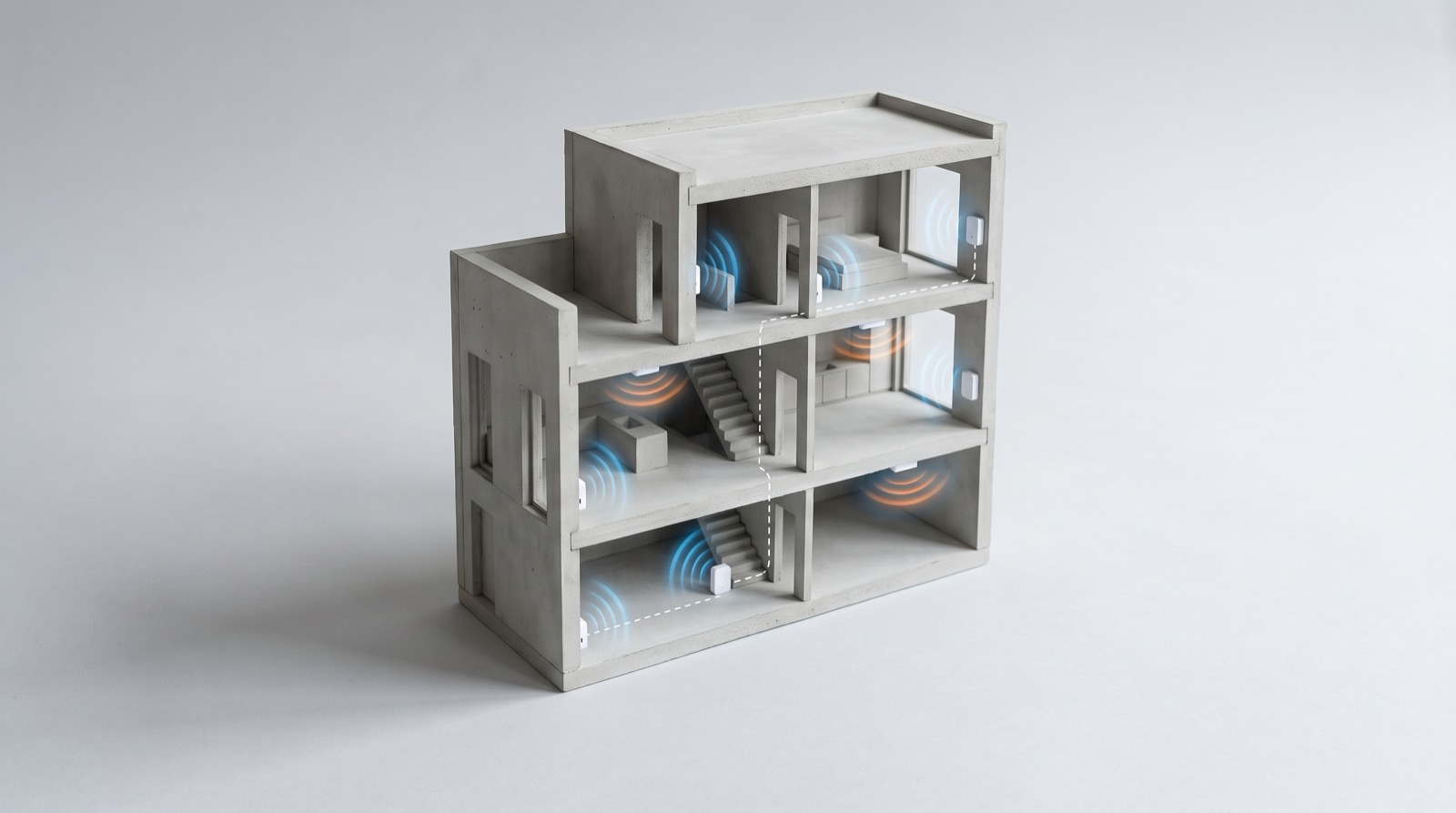
Answer up front — A Zigbee mesh gets its range from mains-powered devices, not battery devices. In a three-storey Malaysian landed house, most of the concrete, the metal reinforcement and the mirror-backed wardrobes will kill a 2.4GHz signal, and the fix is to place Aqara's mains-powered devices — smart switches, plugs, the hub — as a repeating backbone down the spine of the house, then hang battery sensors off that. Do a simple walk-round with a paired phone and the app, note every point where a device drops out, and place the mains backbone on those results.
Aqara is Zigbee-first. Zigbee is a 2.4GHz mesh, and 2.4GHz is the same band your home Wi-Fi uses and the band that does not want to pass through a concrete slab.
Three things kill it in Malaysian houses specifically:
The symptom clients report is always the same: the device works, then stops working. It pairs fine, it works for a day, then "unavailable" after the installer leaves. That is not a product fault — it is a routing problem that only shows up when the mesh topology reshuffles.
Mains-powered devices route. Battery devices do not.
A battery sensor is designed to sleep almost all the time. It wakes, reports, goes back to sleep. It is not a router and it is not meant to be one. If you put a door sensor in the far corner of the upstairs landing, it will only ever talk to whatever mains device happens to be close enough — and if nothing is, it talks to nothing.
Mains-powered devices are the opposite: they are permanently listening and permanently routing traffic. Every smart switch you convert, every smart plug, the hub itself — each one is a potential hop.
| Device type | Powered from | Routes mesh traffic? | Role in your design |
|---|---|---|---|
| Aqara hub (Hub M3, M200, M100, Panel Hub S1 Plus) | Mains | Yes | The backbone's first hop |
| Wall switch with neutral (Z1 Pro, Light Switch H2, Smart 20A Switch H1) | Mains | Yes | Every converted with-neutral switch is a free router |
| Smart plug (Power Plug H2 UK) | Mains | Yes | Good renter-style backstop |
| Ceiling Light T1M | Mains | Yes | Excellent — placed mid-room, above the slab line |
| Motion Sensor P1 | Battery | No | Needs a mains hop within range, especially on landings |
| Door / Window Sensor P2 | Battery | No | Must sit within range of a mains device |
| Presence Multi-Sensor FP300 | Wireless / battery | No | Same — needs a nearby mains hop |
| Water Leak Sensor T1 | Battery | No | Under the sink, a difficult position — plan for it |
Note the Motion Sensor P1 and Water Leak Sensor T1 lines. Both are battery devices, so on a staircase landing or under a kitchen sink they are only as good as the nearest mains device. If nothing mains-powered is close, a converted switch or a UK power plug on that landing is usually the single most useful thing you can add. Whether a particular no-neutral switch routes is model-dependent — check its datasheet before you count it as part of the backbone.
Exact routing behaviour, supported device lists and any firmware-dependent changes: confirm against the current Aqara documentation rather than trusting a list you were given six months ago. This table is design guidance, not a spec sheet.
Do not place devices room by room as you install them. Design the mesh first, then install to the design.
The spine rule. Walk the length of the house — front door to back door, through every floor — and place a mains-powered device at roughly regular intervals along that line. Three-storey landed: ground floor hub, mid landing, first floor landing, upstairs landing, master bedroom. Those five points are the spine. Everything else hangs off them.
The rules of thumb that actually hold up:
You do not need a spectrum analyser. You need the app, a paired device, and honesty.
Method 1 — walk and trigger.
Method 2 — the placement version. Before you install the backbone, place a mains device roughly where you think the backbone should go, then re-test the rooms behind it. Devices that were unavailable should become available. Where they don't, add another mains device between and re-test.
Method 3 — the app's own view. Aqara Home shows a signal or link indicator for reported devices on current firmware. Use it as a directional hint, not as a number to quote.
On numbers: this post deliberately does not give you RSSI thresholds in dBm, acceptable channel counts or pass/fail margins. Those figures vary by firmware, by hub model and by the app version on the client's phone, and a number printed in an article is a number that will be wrong by the time you are on site. Measure the actual drop-out points on the actual house — that is the only number that survives — and confirm any threshold you quote to a client against the current Aqara documentation before you put it in a quotation.
A 2.4GHz Zigbee mesh and a 2.4GHz Wi-Fi network share a band and share airtime. The hub needs a clean, stable network path to reach the app and the cloud. On a Wi-Fi-connected hub such as the Panel Hub S1 Plus, give it a stable SSID on a clear channel — a hub stuck on a congested channel will behave exactly like a mesh fault, and the client will blame the devices.
When you diagnose a "dropping out" report, ask which one it is first: the device shows unavailable in the app (mesh), or the app itself will not load (network). They have completely different fixes and they are constantly confused.
If the client is also adding Matter accessories, that is a different requirement entirely — Matter needs a proper controller such as the Hub M3, set up in Aqara Home first, whereas Zigbee devices can go via the M3 or the S1 Plus. Matter accessories added through the M3 can then be controlled from the S1 Plus. The distinction is in Matter with Aqara: what you actually need.
Put it in the commissioning pack. A column on your test sheet — "mesh position, backed by device at ___" — turns a dead zone from a fault into a documented design decision, and it means the next person to touch the house does not remove a switch thinking it is redundant and quietly break the bedroom.
That sheet, and everything else it should carry, is in smart home commissioning and handover testing.
Zigbee vs Wi-Fi vs Matter smart home in Malaysia compared. Learn why local control matters, what a hub does, and what actually happens when the Wi-Fi drops.
Matter controller smart home Malaysia explained — why Hub M3 is needed first, what Matter adds over Zigbee, and what still works when the ISP is down.
A smart home commissioning checklist Malaysia guide: a per-room test sheet, cold-start automation checks, load tests, board marking and handover pack.
Tell us about your space. Our B2B team will reply within one business day with a recommended setup and quotation.
WhatsApp us →
[email protected]
+603-5880 5486